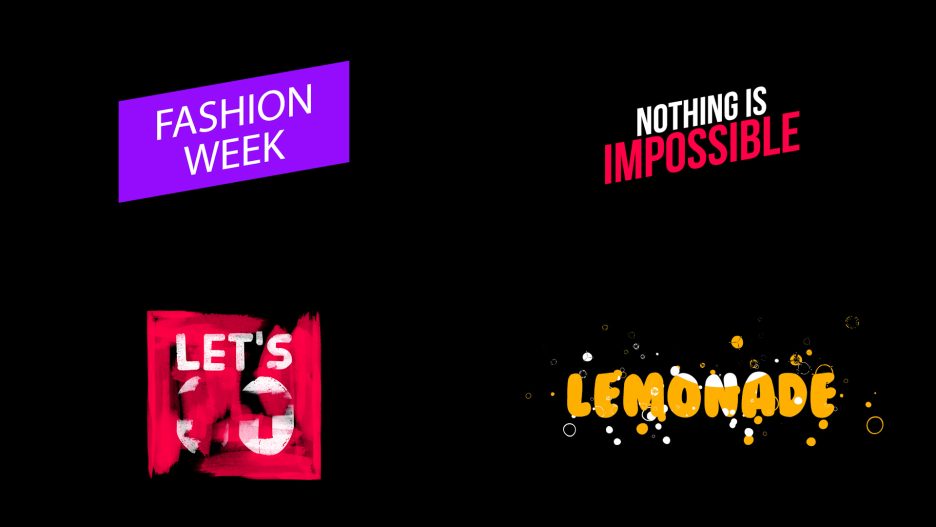
Give your videos a professional visual identity with the Typographer Titles Pack – After Effects & Premiere Pro Template! Create visually engaging titles, stylish text presentations, modern typography sequences, and professional video introductions with this versatile animated titles pack.
Typography is one of the most important elements of visual communication. The way words are presented can influence how viewers understand a message, connect with a brand, and experience a video. Whether you are producing a promotional advertisement, a cinematic video, a YouTube introduction, a documentary, a business presentation, a social media campaign, or a creative film project, well-designed animated typography can make your content more engaging and visually appealing.
The Typographer Titles Pack is designed for creators who want to incorporate professionally styled text presentations into their video editing workflow. Instead of creating every title animation from scratch, you can use the supplied project as a starting point and customize the available elements according to your creative requirements.
With compatibility listed for Adobe After Effects CC18 and Adobe Premiere Pro CC18, this pack offers a useful resource for editors working with motion graphics and video production. Its customizable features make it suitable for a variety of creative applications, from simple title introductions and text overlays to promotional content, cinematic presentations, social media videos, and professional brand communication.
Whether you are a beginner learning video editing, a professional motion graphics designer, a freelance video editor, a filmmaker, a YouTuber, or a digital marketing professional, this typography pack can help you explore different ways to present information through animated text.
With no additional plugins required, an easy-to-use workflow, fast rendering as listed in the project features, music included, and a collection file size of approximately 1.9 GB, the Typographer Titles Pack is a substantial creative resource for your video editing library.
✨ Transform Ordinary Text into Engaging Visual Content
Text is more than just words on a screen. In video production, typography can communicate ideas, introduce subjects, highlight important information, establish a visual mood, and guide the viewer’s attention.
A well-presented title can make a simple message feel more professional. An animated heading can introduce a new section, while a carefully designed text presentation can help explain an idea or emphasize an important statement.
The Typographer Titles Pack provides a starting point for incorporating animated typography into your creative projects. It is suitable for editors who want to explore modern text-based visual presentations without having to build every title animation independently.
Use the available title designs to enhance:
- Video introductions and opening sequences.
- Cinematic title presentations.
- Promotional advertisements.
- YouTube videos and channel branding.
- Business and corporate presentations.
- Documentary and interview videos.
- Social media content.
- Product launch announcements.
- Educational and tutorial videos.
- Film and video production projects.
- Digital marketing campaigns.
- Creative portfolios and showreels.
Typography can become a central part of your visual storytelling when it is used with the right timing, placement, color, and hierarchy.
🎬 A Complete Typography Resource for Video Editors
The Typographer Titles Pack is intended for creators who frequently work with text-based video elements and want a convenient collection of title designs to incorporate into different projects.
Animated titles can serve several purposes throughout a video. They can introduce a person, display a location, communicate a key message, highlight a product feature, divide a presentation into sections, or provide additional context to the footage.
Rather than treating typography as an afterthought, you can use it as an important part of your video’s overall design.
This pack can be considered for:
- Main titles and opening headings.
- Section titles and chapter introductions.
- Supporting text and information overlays.
- Promotional headlines.
- Brand and company messages.
- Video captions and visual emphasis.
- Creative text compositions.
- Documentary-style information screens.
- Presentation headings.
- Social media promotional titles.
- Portfolio and showreel typography.
- Branded video communication.
The available title styles and editing options will depend on the supplied project structure. Review the compositions and customization instructions to determine which elements are suitable for your particular project.
🚀 Project Features
The Typographer Titles Pack includes the following features according to the supplied project specifications:
- Project Name: Typographer Titles Pack
- Software Compatibility: Adobe After Effects CC18 and Adobe Premiere Pro CC18
- Resolution Listed: 1920 × 1080 pixels
- Aspect Ratio: 16:9 widescreen
- Plugins: No additional plugins required
- Ease of Use: Easy to use
- Rendering: Fast render, as listed in the supplied features
- Customization: Customizable project elements
- Tutorial Support: Check Tutorial Page for Editing Templates
- Audio: Music included
- File Size: Approximately 1.9 GB
- Availability: Listed as Free Download
Resolution clarification: The supplied specifications mention “4K – 1920 × 1080.” However, 1920 × 1080 pixels is Full HD resolution, not native 4K. Native 4K UHD resolution is 3840 × 2160 pixels. The actual composition dimensions should be checked in the project before advertising it as native 4K.
🔤 Modern Animated Typography for Professional Videos
Typography plays a significant role in modern video editing. The right text treatment can help create a visual connection between the message and the audience.
Animated typography is especially useful when you want to communicate information without relying entirely on voice-over or visual footage. It can make key statements more noticeable, improve the structure of a video, and create a more engaging viewing experience.
The Typographer Titles Pack can be used as a starting point for creating text-based presentations that complement different types of video content.
For example:
- A filmmaker can use animated titles to introduce a film or documentary.
- A YouTuber can use title elements to highlight important topics.
- A business can use text presentations to communicate product benefits.
- A digital marketer can use animated headlines in advertisements.
- A teacher or trainer can use titles to organize educational videos.
- A content creator can use typography to emphasize important messages.
- A video editor can use title elements to add variety to client projects.
Good typography is not simply about choosing an attractive font. It is about presenting information in a way that is readable, appropriately structured, and consistent with the visual style of the video.
💻 Compatible with Adobe After Effects CC18
The pack lists compatibility with Adobe After Effects CC18, making it suitable for users working with this version of Adobe’s motion graphics and visual effects software.
After Effects is widely used for animated typography, motion graphics, compositing, title sequences, visual effects, and branded video presentations.
Working with an existing typography project can simplify the process of creating animated text elements. Instead of designing and animating every title from the beginning, you can open the supplied project, review the available compositions, and customize the supported elements.
This can be useful for:
- Motion graphics designers.
- Professional video editors.
- Freelance creative professionals.
- YouTube content creators.
- Advertising and marketing agencies.
- Film and documentary editors.
- Corporate video production teams.
- Students learning motion graphics.
- Creative studios and production houses.
If you are using a newer version of After Effects, compatibility may depend on the project structure and the features used. Open the project and check that all compositions and associated assets work correctly before starting your final production.
🎞️ Compatible with Adobe Premiere Pro CC18
One of the important features supplied for this project is compatibility with Adobe Premiere Pro CC18 in addition to After Effects.
Premiere Pro is widely used for editing video footage, arranging sequences, adding transitions, working with audio, and producing final video content.
For editors who use both Premiere Pro and After Effects, having access to typography resources that support these applications can be useful when working across different stages of a video production workflow.
You can use Premiere Pro for assembling your main video, organizing footage, adjusting the sequence, and preparing the final edit. Where the supplied project supports it, After Effects can be used for additional customization of motion graphics and animated typography.
This combination can be especially useful for creators who produce:
- Corporate and promotional videos.
- YouTube content.
- Social media advertisements.
- Product presentations.
- Documentary videos.
- Educational content.
- Event highlights.
- Marketing campaigns.
- Creative showreels.
- Brand introduction videos.
Check the supplied project files and tutorial instructions to understand how the titles are organized and which editing workflow is supported.
⚡ No Plugins Required – A Convenient Editing Experience
The Typographer Titles Pack is listed as requiring no additional plugins.
This is a useful feature for video editors who want to avoid unnecessary third-party plugin installations and additional setup requirements.
Some motion graphics templates depend on external plugins to display certain effects or render compositions correctly. These dependencies can create extra work, particularly when moving projects between computers or collaborating with other editors.
A no-plugin requirement can make the editing workflow more convenient for users who prefer to work with their existing Adobe software installation.
It is particularly useful for:
- Beginners learning After Effects.
- Premiere Pro video editors.
- Freelancers working on multiple client projects.
- Small video production teams.
- Digital marketing professionals.
- Students and creative learners.
- Content creators producing regular videos.
You can focus on reviewing the title compositions, customizing the supported text elements, and incorporating the titles into your video project.
Please note that the absence of additional plugins does not eliminate the need for compatible Adobe software, required project assets, or any instructions supplied with the template.
🎨 Customizable Typography for Different Creative Projects
Every video has a different purpose, audience, and visual identity. A title style that works for a corporate presentation may not be appropriate for a music video, documentary, advertisement, or social media campaign.
The Typographer Titles Pack is described as customizable, making it a useful starting point for adapting the supplied title elements to different creative requirements.
Depending on the editable elements included in the project, you may be able to modify text, replace placeholder content, adjust supported settings, and adapt the presentation to suit your video.
Customization is especially important when working with client projects or maintaining a consistent brand identity.
You can consider adapting the typography for:
- Company names and brand messages.
- Main video headings.
- Promotional headlines.
- Product names and descriptions.
- Personal branding.
- Interviewee names and designations.
- Documentary chapter titles.
- Educational headings.
- Event announcements.
- Social media messages.
- Creative statements.
- Portfolio presentations.
When customizing titles, pay attention to text length, readability, contrast, alignment, and placement. A good title should communicate the intended message clearly without overwhelming the surrounding video.
📺 Perfect for YouTube Videos and Content Creators
YouTube creators frequently use text overlays and animated headings to make their videos more structured and visually engaging.
A well-designed title can introduce a topic, emphasize a key point, display a person’s name, highlight a product, or separate different sections of a video.
The Typographer Titles Pack can be considered for YouTube creators who want to add more variety to their video presentations.
It may be useful for channels covering:
- Technology and gadget reviews.
- Education and online learning.
- Business and entrepreneurship.
- Travel and lifestyle.
- Gaming and entertainment.
- Tutorials and how-to videos.
- Film and video editing.
- Product reviews.
- News and commentary.
- Creative design.
- Marketing and advertising.
- Personal development.
Potential applications include:
- YouTube video titles.
- Channel introduction sequences.
- Topic headings.
- Section separators.
- Name and designation presentations.
- Product feature highlights.
- Promotional text overlays.
- Video announcements.
- Branded content.
- Channel trailers.
- Educational video headings.
- Video outro presentations.
For the best viewing experience, keep your text concise and readable. Avoid placing too many animated elements on screen at the same time, particularly when viewers need to focus on the main video content.
📱 Social Media Content and Reels
Social media content is often consumed quickly, making clear and visually engaging text particularly important.
Animated typography can help capture attention, communicate an important message, and provide structure to short-form promotional videos.
The Typographer Titles Pack can be used as a starting point for creating text-based visual elements for social media videos and marketing campaigns.
Potential applications include:
- Instagram promotional videos.
- Instagram Reels.
- Facebook advertisements.
- LinkedIn business content.
- YouTube Shorts.
- Product announcement videos.
- Brand awareness campaigns.
- Promotional reels.
- Event announcement videos.
- Digital marketing content.
- Business introduction videos.
- Creator branding content.
The supplied project dimensions are 1920 × 1080 pixels, which is a horizontal 16:9 format. If you want to use the titles in vertical content, you may need to create or adjust the composition to suit the required aspect ratio.
Always preview the reframed titles to ensure that the text remains readable and does not extend outside the visible area.
🏢 Ideal for Corporate Videos and Business Presentations
Corporate videos often need to communicate information clearly and professionally. Titles can help organize information, introduce speakers, identify departments, highlight important figures, and establish a consistent visual structure.
The Typographer Titles Pack can be considered for businesses and organizations producing branded video content, internal communication, promotional presentations, and company profile videos.
It may be useful for:
- Company introduction videos.
- Corporate presentations.
- Business profile videos.
- Service introduction videos.
- Product demonstrations.
- Marketing presentations.
- Employee introduction videos.
- Training and onboarding content.
- Conference presentations.
- Event highlight videos.
- Company announcements.
- Brand storytelling.
For a corporate project, select title designs that complement the organization’s existing visual identity. Keep typography readable and ensure that the presentation supports the company’s message.
🎬 Useful for Filmmakers and Documentary Editors
Titles are an essential part of many film and documentary productions. They can introduce a story, establish context, identify people, display locations, and divide a long presentation into meaningful sections.
The Typographer Titles Pack may be useful for filmmakers and documentary editors who want a collection of title resources for their video production workflow.
Potential applications include:
- Film title presentations.
- Documentary headings.
- Interview name presentations.
- Chapter introductions.
- Location titles.
- Story section headings.
- Behind-the-scenes videos.
- Short film presentations.
- Independent film projects.
- Video essays.
- Film festival promotional videos.
- Creative storytelling projects.
Typography should support the mood and storytelling style of the film. A title sequence that fits the visual language of the project can help create a more consistent viewing experience.
📢 Powerful Titles for Advertising and Digital Marketing
Advertising and promotional videos often depend on short, memorable messages. Animated typography can help highlight those messages and make important information easier to notice.
The Typographer Titles Pack can be considered by digital marketing professionals, advertising agencies, creative studios, and businesses producing promotional video content.
You can use suitable title elements for:
- Product promotions.
- Brand advertisements.
- Service announcements.
- Campaign headlines.
- Promotional offers.
- Product feature highlights.
- Business announcements.
- Event marketing.
- Brand storytelling.
- Digital advertisements.
- Online commercial videos.
- Social media marketing campaigns.
For advertisements, ensure that the most important message is easy to understand and that the typography remains readable on mobile screens.
🎓 Great for Educational Videos and Online Courses
Educational and instructional videos often contain multiple topics, explanations, definitions, and important points. Animated titles can help organize this information and guide viewers through the learning process.
The Typographer Titles Pack may be useful for educators, trainers, institutions, online course creators, and educational content producers.
Possible applications include:
- Online course introductions.
- Lecture headings.
- Chapter titles.
- Subject introductions.
- Tutorial sections.
- Topic summaries.
- Instructor introductions.
- Educational promotional videos.
- Training presentations.
- Workshop videos.
- Webinar recordings.
- Learning module introductions.
Using a consistent title style across an educational series can help learners recognize different sections and create a more organized presentation.
🎧 Music Videos, Entertainment, and Creative Content
Typography is also an important part of entertainment and music-related video production. Animated titles can introduce artists, display song information, highlight event details, and create visual interest.
The Typographer Titles Pack can be considered for:
- Music promotional videos.
- Artist introductions.
- DJ promotional content.
- Entertainment channel branding.
- Event announcement videos.
- Creative showreels.
- Music producer presentations.
- Performance videos.
- Artist portfolio content.
- Digital entertainment promotions.
- Behind-the-scenes videos.
- Creative studio presentations.
The project features indicate that music is included. Review the supplied audio and determine whether it is suitable for your project. Before publishing commercial or monetized content, check the applicable licensing terms for the included music.
🧑💻 A Useful Resource for Freelance Video Editors
Freelance video editors frequently handle different types of content for clients, from promotional videos and advertisements to YouTube content, business presentations, and social media campaigns.
A collection of reusable title resources can help editors develop a more efficient production workflow.
The Typographer Titles Pack can be considered as a resource for building title sequences and text-based presentations for suitable client projects.
It may be useful when working with:
- Small and medium-sized businesses.
- Digital marketing agencies.
- YouTube creators.
- Educational institutions.
- Event organizers.
- Corporate clients.
- Film production teams.
- Personal brands.
- Product-based businesses.
- Creative studios.
Instead of repeatedly building similar title elements from scratch, you can review the available compositions and adapt the supported elements to the requirements of each project.
Always verify the template’s licensing permissions before using it in paid client work or commercial productions.
🎨 Typography and Visual Storytelling
Typography can influence the personality and tone of a video. Different text styles can communicate different ideas, and the way a title is positioned can influence how viewers interpret the information.
For example, a large heading can establish the subject of a presentation, a smaller subtitle can provide additional context, and a sequence of titles can help organize a complex topic into understandable sections.
The Typographer Titles Pack can be used as a starting point for exploring these creative possibilities.
When designing a title sequence, consider the following principles:
Visual hierarchy: Make the most important words stand out through appropriate sizing and positioning.
Readability: Ensure that viewers can understand the text without unnecessary effort.
Contrast: Use sufficient contrast between text and background.
Consistency: Maintain a consistent visual language throughout the video.
Timing: Allow viewers enough time to read the information.
Placement: Keep important text within the visible frame and away from areas where it may be obscured.
Purpose: Use animation to support the message rather than distract from it.
A strong typography presentation combines good design with clear communication.
⚡ Fast Rendering and a Convenient Workflow
The supplied project features list fast rendering as one of the benefits of the Typographer Titles Pack.
Actual rendering performance will depend on your computer’s hardware, Adobe software version, project complexity, composition settings, footage, and output format.
When working with a large collection of title elements, it is helpful to keep your project organized and render only the compositions you need for your final video.
For a more convenient workflow:
- Review the available compositions before editing.
- Identify the titles that suit your project.
- Save a separate working copy.
- Customize only the elements you need.
- Preview the titles before final rendering.
- Use suitable output settings.
- Keep all related assets organized.
- Review the exported video before publishing.
A structured editing process can help you manage larger projects and reduce unnecessary rendering work.
📚 Tutorial Page for Editing Templates
If you are new to After Effects or Premiere Pro templates, the tutorial resource can help you understand the editing workflow.
The supplied project features specifically recommend checking the Tutorial Page for Editing Templates. Refer to the relevant tutorial for instructions on opening the project, customizing available elements, and preparing your final output.
Before editing, make sure that the downloaded project has been extracted correctly and that all associated files are available.
Since this pack has a listed file size of approximately 1.9 GB, allow sufficient time for the download and extraction process. A stable internet connection and adequate storage space are recommended.
Keep the project folder organized and avoid separating associated assets from the main project unless the tutorial specifically instructs you to do so.
📦 Large Collection – Approximately 1.9 GB
With a listed file size of approximately 1.9 GB, the Typographer Titles Pack is a substantial download compared with lightweight individual logo animation templates.
A larger project package may contain multiple project files, compositions, supporting assets, or other resources, although the exact contents should be confirmed from the supplied download.
Before downloading, make sure you have sufficient storage space on your computer. You should also allow additional space for extracting compressed files and saving customized project versions.
For better project management, consider the following:
- Use a dedicated folder for the downloaded pack.
- Keep the original project files unchanged.
- Extract all required files before opening the project.
- Avoid moving associated assets independently.
- Save customized versions separately.
- Maintain a backup of important project files.
- Remove temporary files only after confirming that they are no longer required.
Organizing the project properly can make it easier to work with the title resources and reuse them in future video productions.
🌐 Build a Consistent Typography Style Across Your Videos
Consistency is an important element of professional video branding. When your headings, title presentations, typography, and colors follow a recognizable visual direction, your videos can feel more unified.
The Typographer Titles Pack can serve as one resource for developing a consistent title presentation across your video projects.
For example, a YouTube creator can use similar title treatments across a series of videos. A business can maintain consistent headings across product presentations and promotional videos. An educational institution can use matching title styles across different lecture recordings and training modules.
You can also combine animated titles with:
- Logo introductions.
- Lower-third graphics.
- Name and designation presentations.
- Section headings.
- End screens.
- Promotional text overlays.
- Brand colors and typography.
- Video transitions.
- Supporting motion graphics.
The objective is to create a visual system that makes your content easier to recognize and understand.
💡 Tips for Getting the Best Results
Choose the right title for the message: Select a typography style that matches the purpose of your video.
Keep your text concise: Shorter headings are generally easier to read and work well in animated presentations.
Use appropriate fonts: Ensure that your text remains legible and complements your brand identity.
Maintain visual hierarchy: Highlight important information without making every element compete for attention.
Check text placement: Keep titles within the visible composition area.
Preview the complete animation: Review timing, readability, and the overall presentation.
Maintain consistent branding: Use compatible colors, typography, and design elements throughout your project.
Save a separate project copy: Protect the original template and preserve your customized version.
Check the tutorial: Follow the supplied editing instructions for the correct workflow.
Allow sufficient storage: The project is approximately 1.9 GB, so plan for additional space when extracting and editing.
Check audio licensing: Verify the permissions for the included music before commercial use.
Choose the correct export format: Match your final video settings to the platform where you intend to publish.
📋 Complete Technical Specifications
- Template Name: Typographer Titles Pack
- Category: Animated Typography / Titles Pack / Motion Graphics
- Software: Adobe After Effects CC18 and Adobe Premiere Pro CC18
- Composition Dimensions: 1920 × 1080 pixels
- Aspect Ratio: 16:9 widescreen
- Resolution Classification: Full HD
- Native 4K: Not confirmed by the supplied dimensions
- Plugins Required: No additional plugins required
- Editing Workflow: Easy to use
- Rendering: Fast render, as listed
- Customization: Customizable
- Tutorial: Check Tutorial Page for Editing Templates
- Audio: Music included
- File Size: Approximately 1.9 GB
- Download Availability: Listed as Free Download
🔥 Why Choose the Typographer Titles Pack?
If you regularly produce videos that require attractive text presentations, the Typographer Titles Pack is a useful creative resource to consider.
Typography is an essential part of modern video editing. It helps introduce subjects, highlight important information, communicate brand messages, and structure visual content. Having access to a dedicated title pack can give you a convenient starting point for incorporating animated text into your projects.
The key listed features of this pack include:
- Compatibility with After Effects CC18 and Premiere Pro CC18.
- No additional plugins required.
- Easy-to-use project workflow.
- Customizable elements.
- Fast rendering, as listed.
- Music included.
- Tutorial support.
- A substantial project package of approximately 1.9 GB.
These features make it suitable for video editors, motion graphics designers, filmmakers, YouTubers, educators, digital marketers, freelancers, creative agencies, and professional video production teams.
Whether you are preparing a cinematic introduction, a promotional video, a business presentation, an educational tutorial, or a social media campaign, the pack can provide a starting point for creating visually engaging typography.
🎯 Final Thoughts
Take your video presentations to the next level with the Typographer Titles Pack After Effects & Premiere Pro Template.
Designed for creators who want to incorporate animated typography into their video editing workflow, this pack provides a starting point for creating professional title presentations across a wide range of creative applications.
From YouTube videos and corporate presentations to cinematic projects, promotional advertisements, documentaries, educational content, social media campaigns, and creative portfolios, animated typography can help make your message clearer and your visual presentation more engaging.
With compatibility listed for Adobe After Effects CC18 and Premiere Pro CC18, no additional plugins required, customizable elements, an easy-to-use workflow, music included, and a project file size of approximately 1.9 GB, this pack is a substantial resource to explore for your next video production.
Whether you are a beginner learning motion graphics or an experienced editor working on professional projects, the Typographer Titles Pack can help you bring more creative possibilities to your text-based video presentations.
Download the pack from the source offering the project, check the editing tutorial, explore the available title compositions, customize the elements, and incorporate the typography into your next creative production.
Make every word more impactful. Bring your message to life with animated typography and create professional video presentations with the Typographer Titles Pack!
https://youtu.be/kfbf2Emxl1Y

